


RazgrizR4
Administrators
-
Joined
-
Last visited
Everything posted by RazgrizR4
-
I have my favourites list but this one always hits hard
-
 TwitchRazgrizR4 - TwitchRazgrizR4 streams live on Twitch! Check out their videos, sign up to chat, and join their community.
 -
I would recommend watching everything but TYBW is the best anime ive seen in a minute
-
Scout all day, I know its dangerous but i would be a 3d master
-
Yeah I can't wait for it to drop.....also tides of annihilation looks fire too
-
Y6 we went to Spain, 1 week in Costa del Sol with school. Epic holiday without parents
-
Finally the Pre orders are ready for this OP looking game developed by Sony and Chinese S-Game. What are people thinking on this??? Pre-order Trailer below: -

-
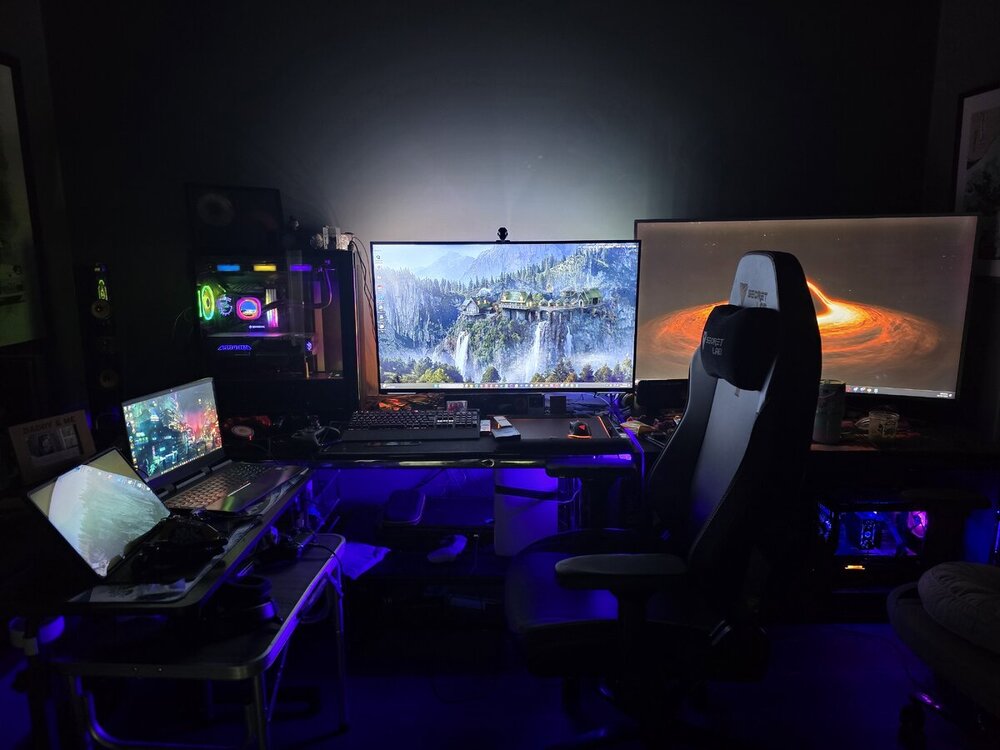
Here is my most recent set although I have some things in the Pipeline 😉
-
Can't remember my first online game those be the dark ages it was sooo long ago but the original battlefront will always be with me
-
I have so many hours on both Forza's it's unreal I think I've owned every one. Best car so far on Horizon 6 without a doubt at the moment is the RX7 and I've been doing my own setups since Gran Turismo 3....So all home built rides in my garage!!!
-
Done!!! You can find the new 'Rate my Rig!!' Section in the PC Zone!! Thanks for the suggestion Shady!!!
-
Not a war game more like a over the shoulder Sci-fi fantasy Ninja hack and slash/shooter. It's pretty good and there is content for days I think I first started playing in 2014 and it's still going strong
-
Played 1 and 2 for me 2 is a perfect mix. Need to try 3 but the look of it feels like it went off script
-
I think Naruto has some good ones to be fair but I think Bleach has more of my higher rated ones For Naruto - Sign - Flow Diver - NICO Touches the Walls Silhouette - KANA-BOOM No Rain, No Rainbow - Homemade Kazoku (From one of the Naruto animovies) Just my Top 4 and in order too!!
-
I mean at a entry level maybe but it follows suit of Sword Art and Log Horizon. Yeah there are some good scenes after Gun Gale but it drops off overall I haven't scene reincarnated as a vending machine. I'll have a look on Crunchy tonight
-
You should really check it out mate. It has some great fight scenes.... Worth a watch 😁
-
Anyone else been playing Warframe? Getting the bug back for playing this game again.
-
Final Season of Bleach is now in play, with a supposed new Arc to follow!! Is anyone else watching?
-
What do we think on this? They say it will bring down costs but whose ours or theirs?? https://kotaku.com/sony-not-budging-on-ending-playstation-discs-in-the-face-of-fan-protests-were-going-to-cautiously-move-this-forward-2000720708?utm_source=kotaku.com&utm_medium=link&utm_campaign=share

-
Same was my favourite. I guess Digimon would count I remember watching the first airing episodes but I think I only got to the first Season..... Sword Art Online was good when it started didn't like the skipping timeline though!!
-
Welcome everyone!! Hope you enjoy what we've worked on so far and look out for the things to come!!
-
Log Horizon was always the one for me
-
 GuidelinesComprehensive Posting Guidelines # 1. General Principles - Be respectful: Treat all members with courtesy, even when disagreeing - Stay on topic: Keep discussions relevant to the subject/category - Quality over quantity: Thoughtful posts are more valuable than numerous short ones - Assume good faith: Give others the benefit of the doubt when interpreting messages # 2. Content Standards - No illegal content or discussions about illegal activities - No copyrighted material beyond fair use (short excerpts with attribution) - No spam or excessive self-promotion - No malicious links, viruses, or harmful code - No personal information (yours or others) without consent - No excessive profanity or hate speech # 3. Formatting Guidelines - Use descriptive titles that clearly indicate post content - Break longer posts into paragraphs for readability - Use bullet points or numbered lists when appropriate - Include relevant tags when available - Quote selectively when responding to others - Use spoiler tags for content that might ruin surprises # 4. Discussion Etiquette - Read previous posts before commenting to avoid repetition - Search before starting new topics to avoid duplicates - Acknowledge good points made by others, even when disagreeing - Back up claims with evidence when possible - Admit mistakes when corrected - Don't "threadcrap" (post negative comments in unrelated threads) # 5. Community Participation - Introduce yourself in the welcome section if available - Thank others for helpful contributions - Report rule violations rather than engaging in public arguments - Help newcomers by answering questions patiently - Participate in community events when available # 6. Content Creation Tips - Start new discussions with open-ended questions to encourage responses - Share personal experiences when relevant to topics - Provide constructive feedback on others' content - Use images and media appropriately to enhance posts - Consider creating original content rather than just sharing links # 7. Conflict Resolution - Address disagreements directly and politely - Don't engage with trolls or those who bait arguments - Take heated discussions to private messages when appropriate - Report personal attacks rather than responding in kind - Step away from heated discussions if becoming emotional # 8. Specialized Content Guidelines For technical discussions: - Include relevant specifications and details - Describe troubleshooting steps already taken - Mark solutions when found to help others with similar problems For creative content: - Respect intellectual property rights - Provide constructive criticism with specific feedback - Consider content warnings for potentially disturbing material For debate/discussion: - Separate facts from opinions - Acknowledge when expressing personal views - Support arguments with evidence when possible # 9. Consequences - Warnings: Warning and content removal - Blocking: Temporary posting restrictions - Banning: Account suspension - Severe violations may result in immediate permanent ban # 10. Reporting System - Report posts that violate guidelines using the report button - Include specific reasons when reporting - Don't report posts just because you disagree with them - Moderators will review reports and take appropriate action These guidelines help create a welcoming environment where diverse perspectives can be shared respectfully while maintaining quality discussions that benefit all members.
 -
GuidelinesComprehensive Posting Guidelines # 1. General Principles - Be respectful: Treat all members with courtesy, even when disagreeing - Stay on topic: Keep discussions relevant to the subject/category - Quality over quantity: Thoughtful posts are more valuable than numerous short ones - Assume good faith: Give others the benefit of the doubt when interpreting messages # 2. Content Standards - No illegal content or discussions about illegal activities - No copyrighted material beyond fair use (short excerpts with attribution) - No spam or excessive self-promotion - No malicious links, viruses, or harmful code - No personal information (yours or others) without consent - No excessive profanity or hate speech # 3. Formatting Guidelines - Use descriptive titles that clearly indicate post content - Break longer posts into paragraphs for readability - Use bullet points or numbered lists when appropriate - Include relevant tags when available - Quote selectively when responding to others - Use spoiler tags for content that might ruin surprises # 4. Discussion Etiquette - Read previous posts before commenting to avoid repetition - Search before starting new topics to avoid duplicates - Acknowledge good points made by others, even when disagreeing - Back up claims with evidence when possible - Admit mistakes when corrected - Don't "threadcrap" (post negative comments in unrelated threads) # 5. Community Participation - Introduce yourself in the welcome section if available - Thank others for helpful contributions - Report rule violations rather than engaging in public arguments - Help newcomers by answering questions patiently - Participate in community events when available # 6. Content Creation Tips - Start new discussions with open-ended questions to encourage responses - Share personal experiences when relevant to topics - Provide constructive feedback on others' content - Use images and media appropriately to enhance posts - Consider creating original content rather than just sharing links # 7. Conflict Resolution - Address disagreements directly and politely - Don't engage with trolls or those who bait arguments - Take heated discussions to private messages when appropriate - Report personal attacks rather than responding in kind - Step away from heated discussions if becoming emotional # 8. Specialized Content Guidelines For technical discussions: - Include relevant specifications and details - Describe troubleshooting steps already taken - Mark solutions when found to help others with similar problems For creative content: - Respect intellectual property rights - Provide constructive criticism with specific feedback - Consider content warnings for potentially disturbing material For debate/discussion: - Separate facts from opinions - Acknowledge when expressing personal views - Support arguments with evidence when possible # 9. Consequences - Warnings: Warning and content removal - Blocking: Temporary posting restrictions - Banning: Account suspension - Severe violations may result in immediate permanent ban # 10. Reporting System - Report posts that violate guidelines using the report button - Include specific reasons when reporting - Don't report posts just because you disagree with them - Moderators will review reports and take appropriate action These guidelines help create a welcoming environment where diverse perspectives can be shared respectfully while maintaining quality discussions that benefit all members. View full article